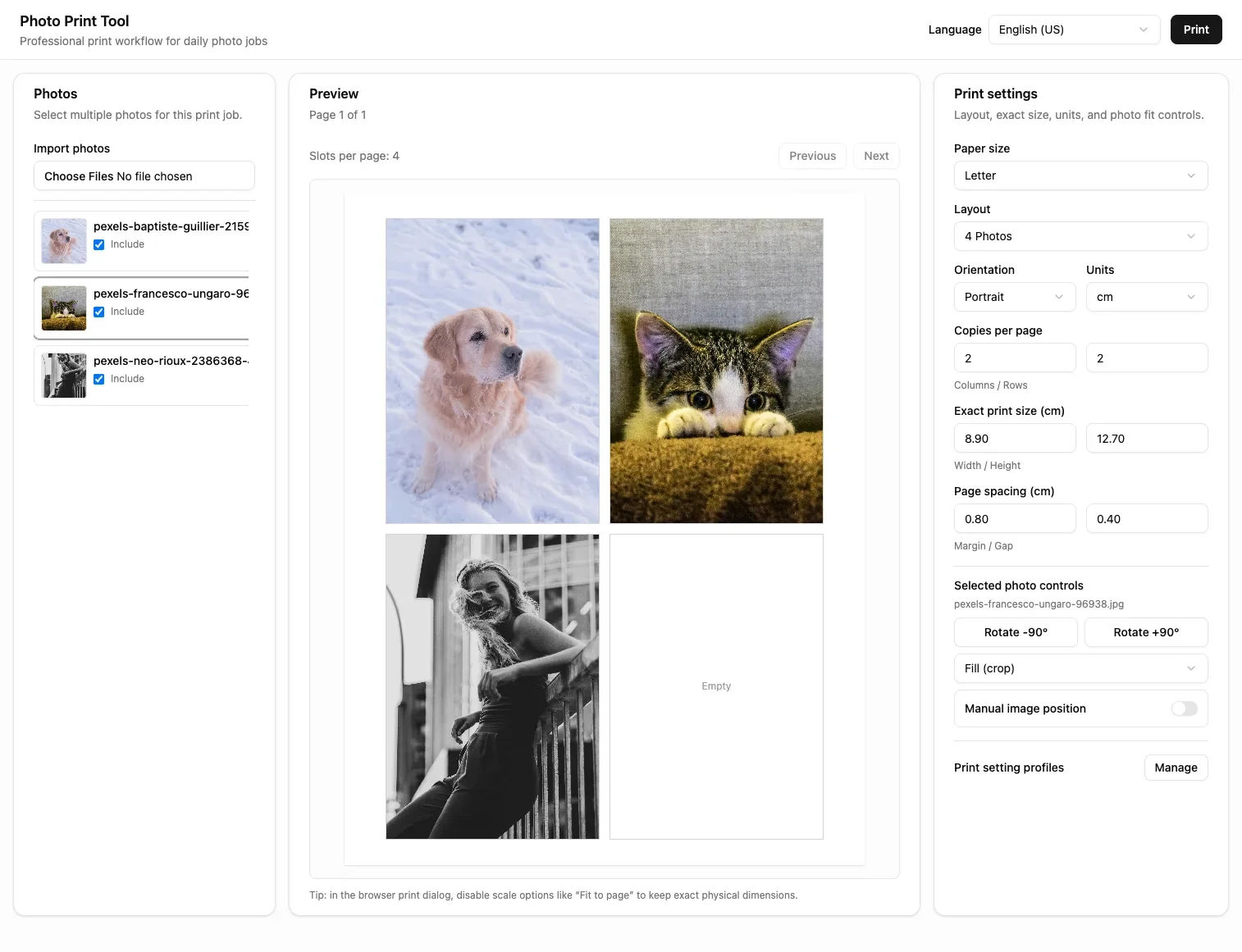
Photo Print Tool
Precise photo layouts for real print workflows.
No account, no uploads, no data leaves your device — everything runs in your browser.
Try it now — instant, no install, no sign-up.
Features
Exact physical dimensions
Design in millimetres, centimetres, or inches. Set paper size, margins, gaps, and cell dimensions with precision. The layout grid calculates everything automatically — no guesswork.
Multi-photo layouts per page
Choose from built-in presets (single, pair, four-up, contact sheet, passport/ID) or set custom rows and columns. Each photo slot is positioned and sized exactly.
Per-photo fit controls
Control how each photo fills its cell — Fill (covers the area, crops edges) or Fit (keeps the whole photo visible). Rotate individual photos and nudge their position for perfect framing.
Paper & layout presets
Built-in sizes for common photo papers (4×6, 5×7, 8×10, A4, Letter, etc.) and professional print stocks. Save your own presets locally and reuse them.
Print-preview zoom
Zoom in and out on the preview canvas to inspect alignment, spacing, and crop lines before you print.
Crop guides
Overlay cut guides around each photo — dashed lines, dotted lines, or crosshairs — to aid trimming after printing.
Low-quality warnings
The preview estimates effective PPI for each photo at the print size and warns when output may be soft.
Dark mode
Switch between light and dark themes. Remembered across sessions.
Multi-language UI
English (US) and Spanish (Latin America) — contributions welcome for more.
How it works
- Import photos from your device — no upload, no server.
- Choose paper size and layout — pick a preset or set custom dimensions.
- Adjust per-photo fit and rotation — fine-tune each slot.
- Print — either from the browser (
window.print()) or via the native desktop app.
Native Desktop App (macOS)
The app also ships as a self-contained desktop binary for macOS that replaces the browser print dialog with direct CUPS printing.
- Discovers all installed printers and their supported paper sizes, qualities, and media types
- Renders pages at native print resolution via offscreen WebKit
- Submits to CUPS with full printer capability negotiation
- Supports job cancellation
Build from source (requires CMake, a C++17 compiler, and the CUPS SDK):
bun run build:desktop      # → desktop/build/photo-print.app (universal: arm64 + x86_64)
bun run package:desktop    # → desktop/build/PhotoPrintTool.dmg
The build targets macOS 13+ and produces an ad-hoc signed .app bundle with the
web assets embedded under Contents/Resources/dist. There is no Developer ID
signature, so a downloaded copy must be opened once via right-click → Open to
get past Gatekeeper.
Privacy
- Zero uploads. Your photos never leave your device — not to a server, not to a cloud.
- No accounts. No sign-up, no login, no user tracking beyond optional Umami analytics (opt-in via env variable).
- Client-side only. The PWA version runs entirely in your browser. The desktop version renders and prints locally.
Technical
Stack
| Layer | Technology |
|---|---|
| Frontend | React 19 + TypeScript + Vite |
| Styling | Tailwind CSS 4 + shadcn/ui (Radix primitives) |
| i18n | i18next + react-i18next |
| Package manager | Bun |
| Desktop (macOS) | C++17 + webview/webview + CUPS + WKWebView |
| Build (desktop) | CMake |
| PWA | Vite PWA plugin (service worker, precache, offline) |
Run the web app
bun install
bun run dev        # → http://localhost:5173
Build for production
bun run build # outputs to dist/Build the desktop binary (macOS)
bun run build:desktopRequires: CMake, Xcode Command Line Tools (includes CUPS SDK, WebKit).
Lint
bun run lintCheck translations
bun run scripts/check-translations.tsDocker
Development
docker build --target dev -t photo-print:dev .
docker run --rm -p 5173:5173 photo-print:dev
Production (Nginx)
docker build --target production -t photo-print:prod .
docker run --rm -p 8080:8080 photo-print:prod
Open http://localhost:8080.
PWA
The app registers a service worker on first visit that precaches all built assets for offline use. Updates apply automatically — the page reloads to activate the latest version.
Environment variables
| Variable | Description |
|---|---|
VITE_UMAMI_URL |
Umami analytics script URL (optional) |
VITE_UMAMI_WEBSITE_ID |
Umami analytics website ID (optional) |
Create a .env file in the project root to enable analytics.
Print note
For accurate physical output, disable print scaling in the browser dialog — choose Actual size or 100% rather than Fit to page.